Task visual · Review and save
Save once. Show exactly what changed.
The Add action creates a Recipe Book entry, returns a receipt with Undo, and keeps Menu creation separate.
Current behaviorCapture immediately creates permanent Recipe and Menu state. The chef reaches a result page with Delete before confirming the source content.
Required behaviorThe chef reviews one canonical recipe screen, selects Add once, and lands on the saved Recipe Book entry with an explicit receipt.
Current and proposed
Keep the full saved recipe visible beneath the receipt.
Current app · actual permanent result
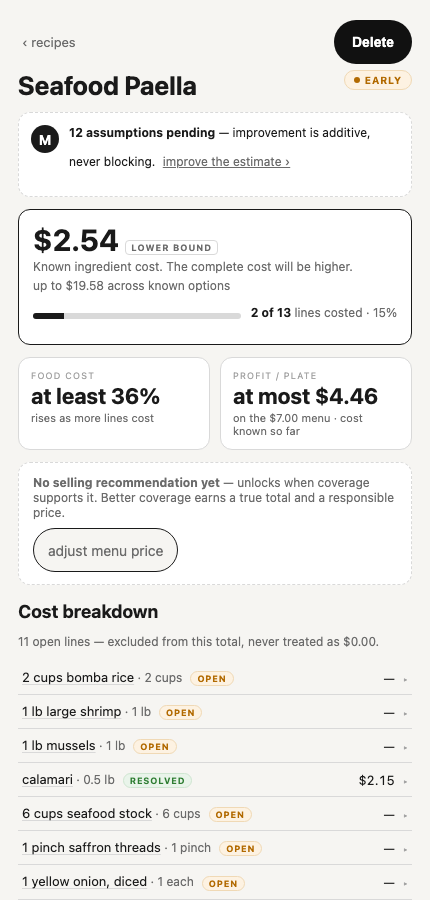
The Delete action shows that persistence already happened. Recipe content was not confirmed and Recipe/Menu meaning was combined.
Proposed acceptance contract · not live · pricing policy illustrative
Recipe Book
Seafood Paella
Added to Recipe Book
Known-cost price floor · illustrative$8.47+
$2.54+ known ingredient cost / serving · policy pending
Seafood stock · 6 cups! decision
Saffron threads · 1 pinch! decision
Frozen peas · 1 cup! decision
Bomba rice · 2 cups— unpriced
Large shrimp · 1 lb— unpriced
Calamari · 0.5 lb✓ priced
Recipe status2 priced · 3 decisions · 8 other open
Source instructions1 found · editable
Yield6 servings
Recipe Book only. No sellable Menu item was created. Build a plate or Menu item when this recipe is ready to sell.
Review 3 high-impact decisions
Add another recipe
This is the post-save destination. The receipt stays at the top while the complete recipe remains available below it; saving preserves progress rather than implying that costing is complete.
Write sequence
One action, one receipt, one reversible result.
1. ReviewThe canonical review shows cost first, complete ingredients, instructions, yield, and attention.
2. AddOne Add action creates or updates the Recipe Book entry.
3. ConfirmThe saved Recipe view echoes what changed and whether open items remain.
4. UndoUndo restores the exact prior recipe and memory state.
Save outcomes
Do not let duplicate handling hide inside Add.
New recipeAdd immediately, show the saved receipt, and keep open lines editable.
Exact duplicateDo not create another entry. Open the existing recipe and say that the same source was already added.
Possible existing recipeIn the interim release, show the likely match and allow save separately or cancel. Update existing follows the content-versioning checkpoint.
Open duplicate and update screens →